Here is a small tragedy that plays out in living rooms every weekend: someone measures their TV stand, buys a “55-inch TV” to fit a 55-inch-wide space, and discovers on delivery day that the screen is only 48 inches wide — with seven inches of stand sitting empty on each side. Or the reverse: they measure a 55-inch gap on the wall and learn the hard way that the TV’s box is 62 inches wide. Both mistakes come from the same misunderstanding of a single industry rule. TVs are measured diagonally across the picture, corner to corner, in inches — and the frame around the picture is not included. Once you truly understand that rule, and know how to verify it with a tape measure in about thirty seconds, TV sizes stop being confusing forever. This is the hands-on guide: the rule, the measuring trick, the math behind it, and fifteen everyday objects the world sizes exactly the same way.
The one rule: corner to corner, picture only
The television industry settled on the diagonal decades ago for a practical reason: it is the only single number that fully describes a rectangle of a known shape. Every modern TV is a 16:9 widescreen rectangle — sixteen units wide for every nine tall — so once you know the diagonal, the width and height are locked in by geometry. The width is always about 87 percent of the diagonal, and the height about 49 percent. A 55-inch TV is therefore always about 47.9 inches wide and 27 inches tall; a 65 is always about 56.7 by 31.9. The diagonal is not an approximation or a marketing fudge — it is a complete description, as long as the shape stays 16:9.
The second half of the rule matters just as much: only the glowing picture counts. The bezel — the plastic or metal frame around the screen — is excluded from the advertised size. That is why a “55-inch TV” is 55 inches of picture but the physical unit is 49 to 50 inches wide. Manufacturers did not choose this to deceive you; they chose it because the picture is the product. Two TVs with the same diagonal and different bezel thicknesses show the identical image — the thinner-bezel model just wastes less space around it. When you shop, think of the diagonal as the picture size and add roughly 1 to 2 inches of total width for the frame when planning furniture.
Measure it yourself: the diagonal trick with a tape measure
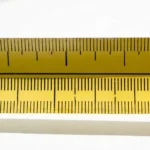
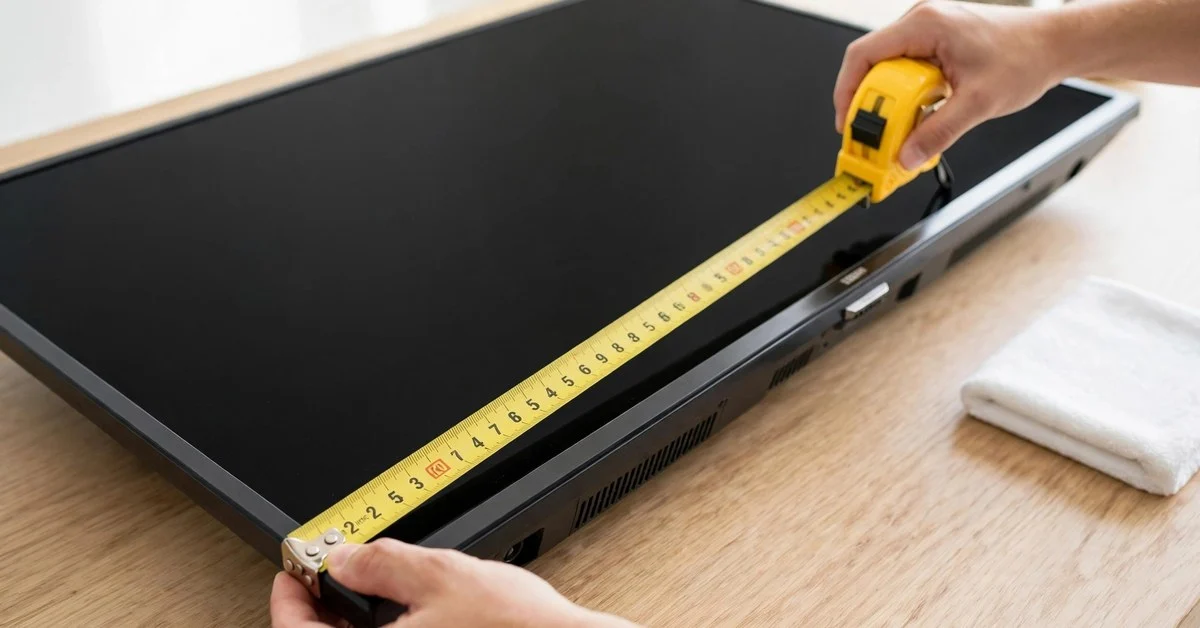
You do not need to trust the box. Here is the thirty-second verification, step by step. Step one: turn the TV on, or at least make sure you can see where the picture ends and the frame begins — measuring the frame is the classic error. Step two: hook the end of a tape measure on the outside corner of the picture itself at the bottom left — the very corner where the image starts, not the plastic edge. Step three: stretch the tape diagonally to the opposite corner of the picture at the top right, keeping the tape flat against the screen. Read the inches. That number is your TV’s size, and on a modern set it will match the advertised diagonal within a fraction of an inch.
No tape measure? There is a math trick that works with just the width. Because a 16:9 screen’s width is always 87.16 percent of its diagonal, you can measure the picture’s width — much easier when the TV is wall-mounted and the corners are hard to reach — and divide by 0.8716. A screen 47.9 inches wide divided by 0.8716 gives you 55 inches. For a quick mental version, add 15 percent to the width: 47.9 plus 15 percent is about 55. It is not exact, but it lands within half an inch, close enough to settle any “is this really a 55?” debate in a store aisle.
Two more pro moves. First, when comparing two TVs side by side in a store, photograph each screen with the tape measure stretched across it — the photos settle the debate later when the showroom’s distorting scale is no longer tricking your eyes. Second, when fitting furniture, measure the whole unit separately: run the tape across the full width including the bezel, and measure the foot span — the distance between the two stand feet — because the feet are what actually have to land on your console. The diagonal tells you the picture; the full-unit width and the foot span tell you the furniture. Measure all three and you will never buy the wrong size again.
Fifteen things the world sizes the same way
The diagonal is not a TV-industry invention — it is how the world puts one number on rectangles and circles alike. Rectangles get the diagonal; circles get the diameter, which is the same idea: one straight line across the whole thing.
- A handheld game console screen (about 7 inches). The Nintendo Switch OLED, the Steam Deck, and their rivals are all sold by diagonal screen size — 7 to 7.4 inches, measured corner to corner across the glass, bezel excluded. The exact same rule as your TV, shrunk to fit your hands.
- A car dashboard infotainment display (8 to 12 inches). That touchscreen in the center console is sold by its diagonal, just like a TV — an 8-inch base screen or a 12-inch upgrade, measured across the lit display. Your car’s screen and your living room’s screen are sized with the same tape.
- A portable DVD player screen (7 to 10 inches). The flip-open players sold for road trips advertise 7, 9, or 10-inch screens — all diagonals. A whole generation learned screen sizing from the back seat before they ever bought a TV.
- A digital photo frame (8 to 15 inches). The frames that cycle through family photos are sold by diagonal, and the same bezel-excluded rule applies: a 10-inch frame’s whole unit is noticeably bigger than 10 inches. Shoppers who learned this on photo frames never get fooled by TV boxes.
- A self-checkout kiosk screen (15 to 22 inches). The touchscreen you tap through at the grocery store is a diagonal measurement — commonly 15 to 22 inches. You have been reading diagonal screen sizes in public for years without noticing.
- An ATM display (about 15 inches). The screen on a cash machine is roughly 15 inches diagonally. Next time you withdraw cash, trace the corner-to-corner line with your eyes — that short diagonal is the TV measurement at its most mundane.
- A point-of-sale touchscreen (about 15.6 inches). The register screens in shops and restaurants are sold by diagonal like tiny TVs. Retail runs on the same sizing convention as your living room.
- A drawing tablet display (13 to 24 inches). Pen displays for digital artists are sold by diagonal — 13, 16, 22, 24 inches — measured across the drawing surface. Artists compare them exactly the way TV buyers compare 55 versus 65.
- A portable USB monitor (about 15.6 inches). The second screens that road warriors plug into laptops are sold by diagonal, 15.6 being the classic size. Same rule, same bezel exclusion, backpack scale.
- A round trampoline (14 feet across). Backyard trampolines are sold by diameter — 12, 14, 15 feet — the circle’s version of the diagonal. One straight line across the whole thing fully describes the size, exactly as the diagonal does for a TV.
- A fire pit ring (about 40 inches across). The steel rings sold for backyard fire pits are sized by diameter, commonly 36 to 44 inches. The diameter tells you everything, just as the diagonal tells you everything about a 16:9 screen.
- A round hot tub (about 78 inches across). Round spas are sold by diameter — 72 to 84 inches is typical. Nobody lists the circumference; the single straight-line number does the whole job, the same philosophy as TV sizing.
- A dinner plate (about 11 inches across). Plates are sized by diameter — 10.5 to 12 inches for dinner plates. You have been using single-number sizing at every meal of your life.
- A manhole cover (about 24 inches across). Standard manhole covers are 24 inches in diameter — a fixed, universal number. The city sizes its circles the way the TV industry sizes its rectangles.
- A kiddie wading pool (about 5 feet across). The plastic pools sold every summer are sized by diameter, commonly 4 to 6 feet. One number, whole object — the diagonal habit applied to summer.
What the diagonal does not tell you
The diagonal is a complete description only when the shape is fixed — and that caveat has bitten buyers before. In the era of 4:3 tube TVs, a 32-inch diagonal meant a screen about 25.6 inches wide and 19.2 inches tall: narrower and taller than today’s 32-inch widescreen at 27.9 by 15.7. Same diagonal, visibly different screen. That is why your memory of a childhood 32-inch TV feels “smaller” than a modern 32 — it was narrower, even though the diagonal matched.
The same trap exists today with ultrawide monitors. A 34-inch ultrawide monitor and a 34-inch TV share a diagonal but not a shape: the ultrawide is 21:9, so it is broader and shorter than the 16:9 TV. Compare diagonals only between identical shapes. Within the TV world this is a non-issue — virtually every TV sold today is 16:9, so a 55 is always bigger than a 50 by the same fixed ratio — but the moment you compare a TV against a monitor, a phone, or an old tube, check the aspect ratio before trusting the diagonal. The number is honest; it just assumes you know the shape.
Measuring questions, answered
Do I measure the screen or the whole TV?
The screen — the lit picture area only, corner to corner. The advertised size never includes the bezel. If you are checking whether a TV is “really” 55 inches, measure the picture’s diagonal. If you are checking whether it fits your stand, measure the whole unit’s width and the foot span separately. Both measurements are useful; they just answer different questions.
Why don’t manufacturers just list the width instead?
Because the diagonal is shorter to say and fully sufficient. “55-inch” is one number that completely describes any 16:9 screen — the width (55 × 0.8716 ≈ 47.9) and height (55 × 0.4903 ≈ 27) follow automatically. Listing width × height would double the numbers on every box without adding information. The convention is also decades old, stretching back to tube TVs, so the entire industry — and every shopper — already speaks it.
How do I convert a TV’s width to its diagonal size?
Divide the picture’s width by 0.8716. That factor is the ratio of width to diagonal for any 16:9 screen (16 divided by the square root of 337). A 47.9-inch-wide picture divided by 0.8716 equals 55 inches. For a quick mental estimate, add about 15 percent to the width — 47.9 plus 15 percent is roughly 55. This trick is handy when the TV is wall-mounted and the corners are hard to reach with a tape.
Are projector screens measured the same way?
Yes — diagonally, in inches, picture only. A “120-inch projector screen” is 120 inches corner to corner, which works out to about 105 inches wide and 59 inches tall for a 16:9 screen. This is why projector screens sound enormous compared to TVs: they are, because the same ruler is being applied at a much bigger scale. It also means you can compare a 65-inch TV against a 120-inch projector screen fairly — same measurement, honest comparison.
Why does my old 32-inch TV look smaller than a new 32-inch TV?
Aspect ratio. Old 4:3 tube TVs used the same diagonal on a squarer shape, so a 32-inch tube was about 25.6 inches wide — more than two inches narrower than a modern 32-inch widescreen at 27.9 inches. The diagonal matched, but the narrower shape made the old screen look smaller. It is the same reason a 34-inch ultrawide monitor looks different from a 34-inch TV: identical diagonal, different rectangle.
See also: how big a 55 inch TV is.
See also: how big a 65 inch TV is.
The tape never lies
TVs are measured diagonally, corner to corner, picture only — five words that end a lifetime of confusion. The diagonal fully describes any 16:9 screen, the bezel is never included, and the width is always about 87 percent of the advertised number. You can verify any TV in thirty seconds with a tape measure, estimate the size from the width with a single division, and fit your furniture with two extra measurements: the full-unit width and the foot span. It is the same one-number sizing the world uses for phones, dashboards, trampolines, and dinner plates. Learn the rule once, and every spec sheet you read for the rest of your life will make instant sense. Now put the tape measure back in the drawer — you will not need it again until the next TV.

I’m Priya Sharma, a content writer at MeasureZit.com, specializing in measurements, unit conversions, and mathematical concepts. I turn technical topics into clear, accurate content that’s easy to understand. My focus is precision, clarity, and genuinely useful information.